NerveCenter platform
Cloud security, cloud cost and AI spend. One AWS-native platform.
NerveCenter connects read-only to every AWS account you run. It finds what is exposed, explains what you spend, tracks what your AI costs per model and request, and ranks what to fix first. Ask it anything in plain language, or from your own AI tools.
 Security posture600+ read-only checks
 Compliance25 frameworks assessed
 Attack pathsInternet to data, traced
 Security × CostFix first what costs most
 FinOpsAllocate, budget, save
 FinOps for AICost per model and request
 AI governancePolicies and approvals
 Built-in AI assistantAsk in plain language
 API and MCPClaude, Gemini, ChatGPT & more
Agentless and read-only · Hosted in the EU · MFA and company SSO · Your data isolated per organization
One platform, not three tools
Security, FinOps and AI governance on one data model.
Most teams run a security scanner, a cost tool and a spreadsheet for AI spend, then try to join them by hand. NerveCenter reads your AWS accounts once and connects the answers. A finding knows what the resource costs. A cost spike knows what changed. An AI model knows its policy and its price per request.
600+
read-only security checks
25
security and compliance frameworks assessed
6
AI security and governance frameworks
EU
hosted and processed in the EU
Security × Cost
Know which risks sit on your most expensive infrastructure.
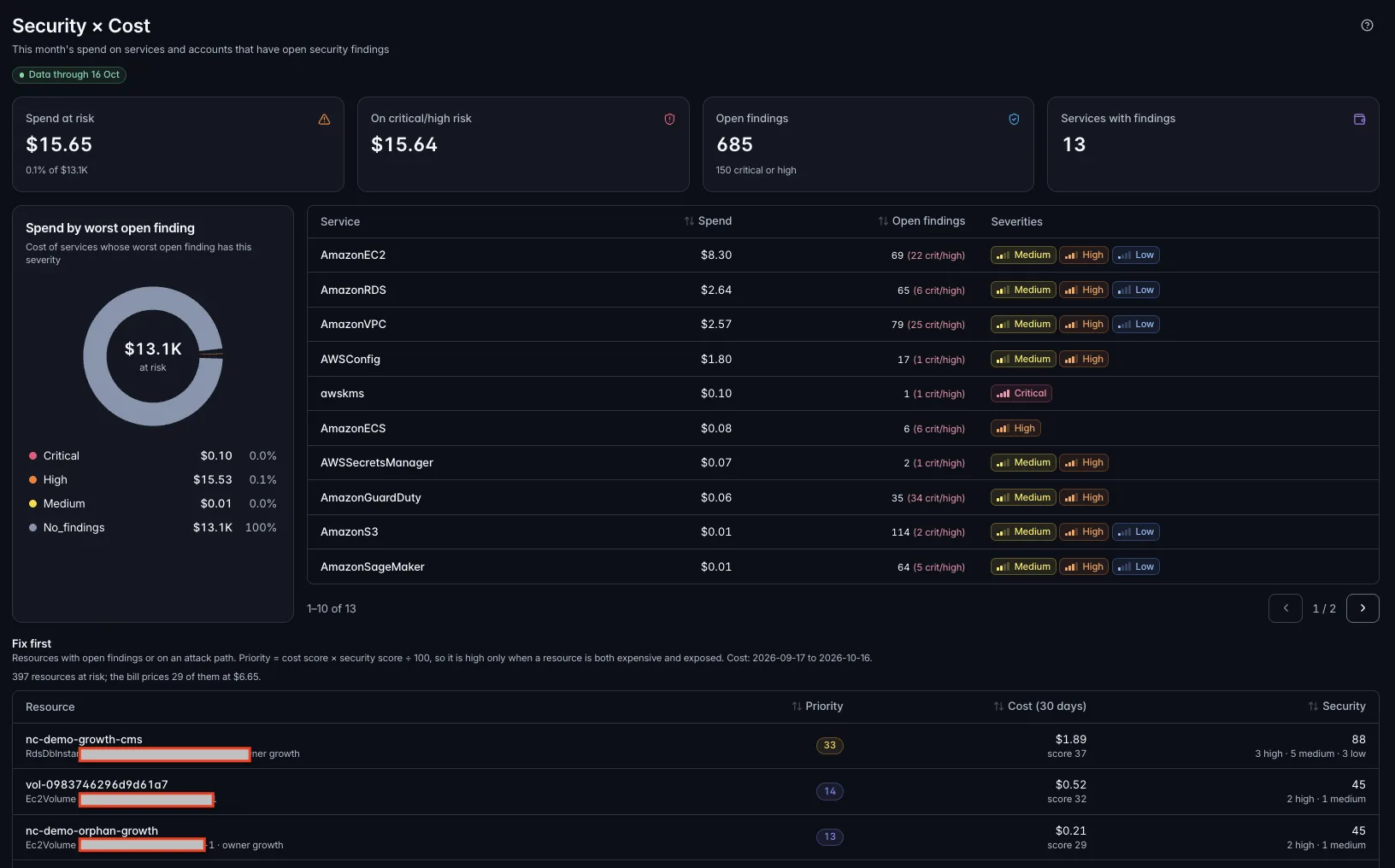
NerveCenter puts every open finding next to the spend of the service and account it affects. You see your spend at risk, how much of it sits on critical and high findings, and which services to fix first. Security and finance work from the same list.
- Spend at risk, and spend on critical and high findings
- Services ranked by spend and worst open severity
- One view for the security lead and the FinOps lead
Security
Continuous, read-only security for every AWS account.
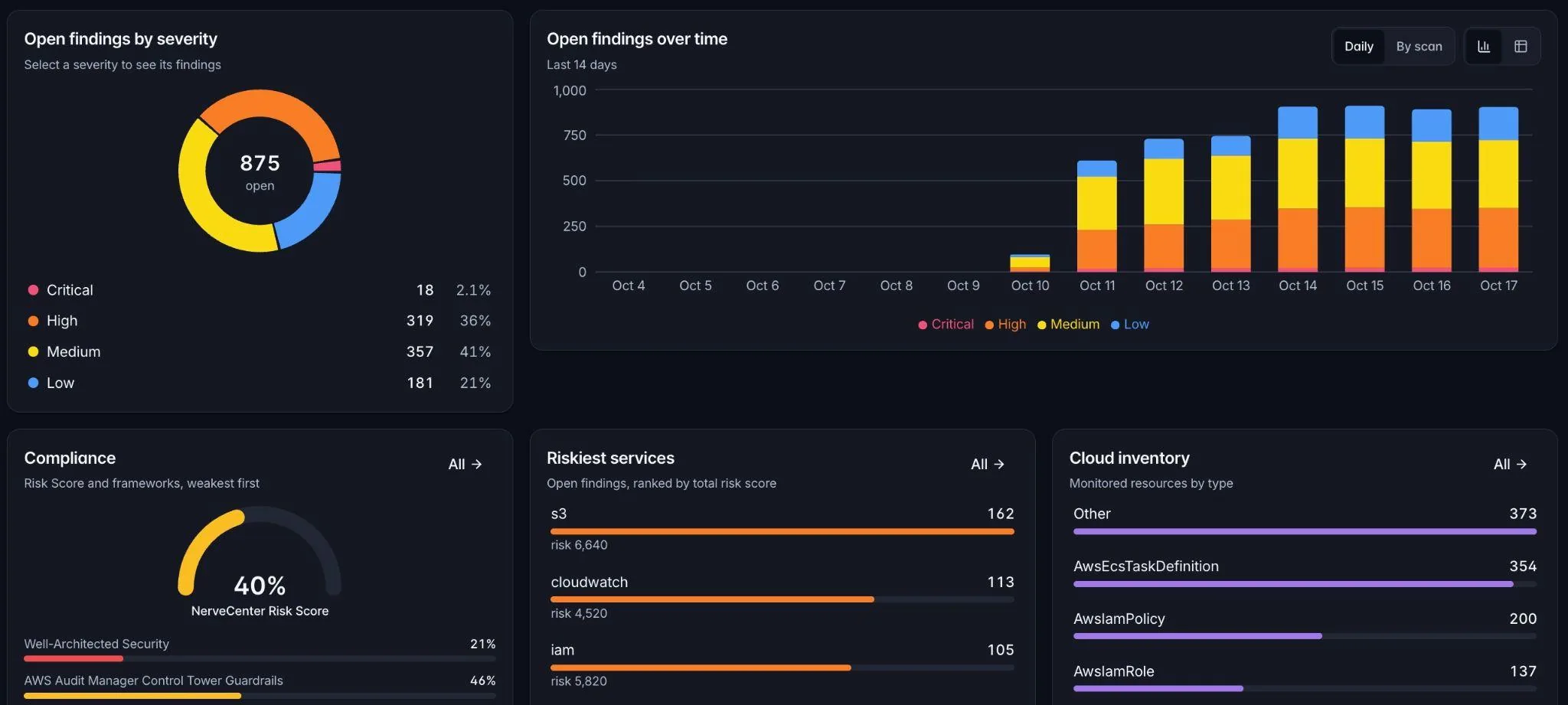
Scheduled and on-demand scans run more than 600 read-only checks across IAM, networking, storage, data, logging and AI services. Every finding has a severity, a plain-language explanation and the steps to fix it. Watch open findings over time and see your riskiest services at a glance.
- Open findings by severity, and the trend day by day
- Riskiest services ranked by total risk
- Cloud inventory of every monitored resource
- Finding lifecycle with fix-by dates, comments and CSV export
- “Verify fix”: re-check one finding on demand
- Alerts for new critical findings, missed fix-by dates and score drops
Compliance
Audit evidence that stays current.
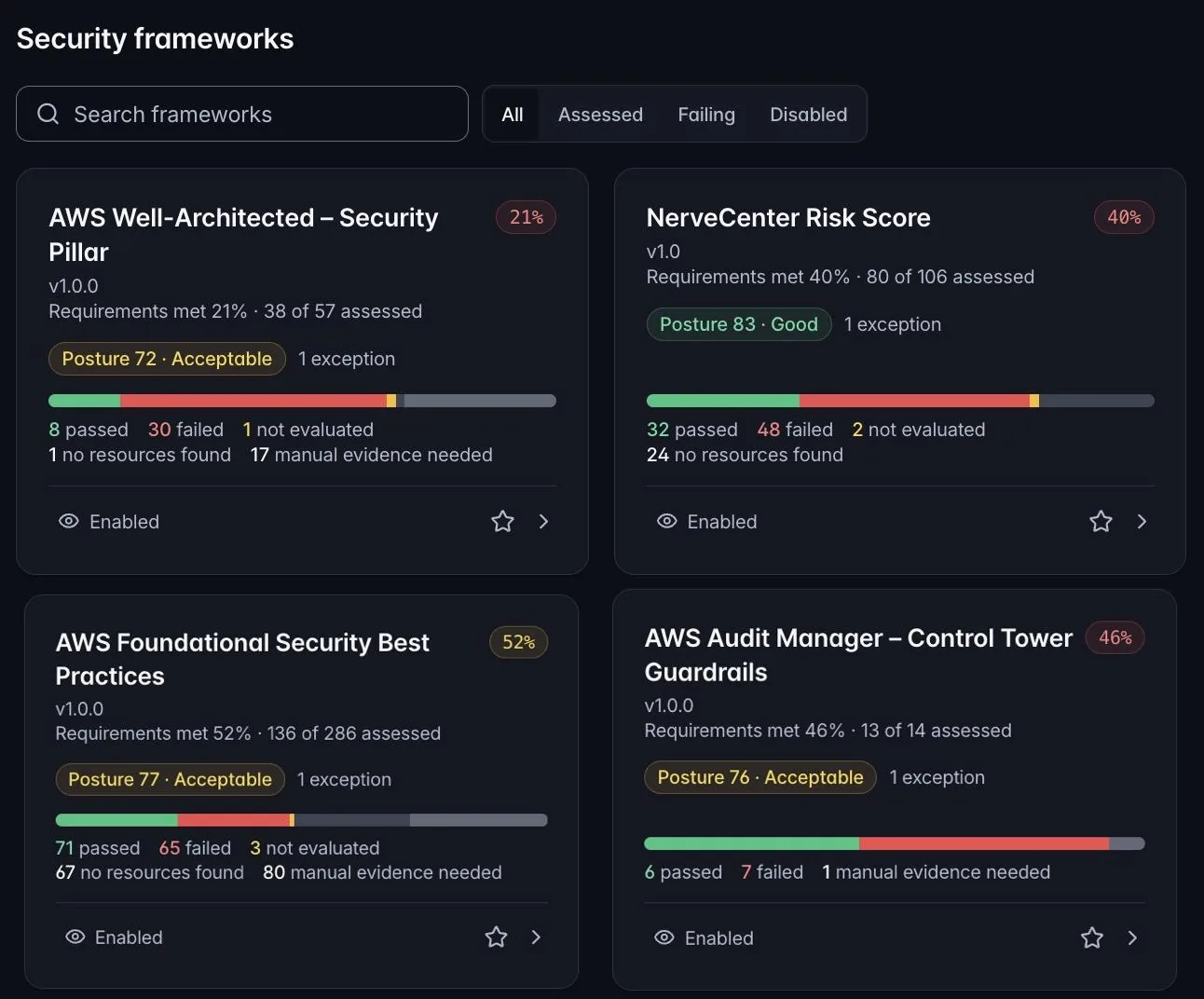
Each scan maps results to the controls of the frameworks you choose. Every framework shows passed, failed and not-evaluated controls, a posture rating, and the manual evidence still needed. Record manual controls with an owner and expiry date, and export any framework to CSV for your auditor.
- CIS AWS Foundations v5.0
- AWS Foundational Security Best Practices
- AWS Well-Architected Security Pillar
- ISO/IEC 27001:2022
- SOC 2
- NIST 800-53 Rev. 5
- NIST CSF 2.0
- PCI DSS v4.0
- HIPAA
- GDPR
- NIS2
- BSI C5
- CSA CCM
- …and more
NerveCenter shows how your AWS configuration measures against each framework. It does not certify compliance.
Attack paths
See how an attacker would reach your data.
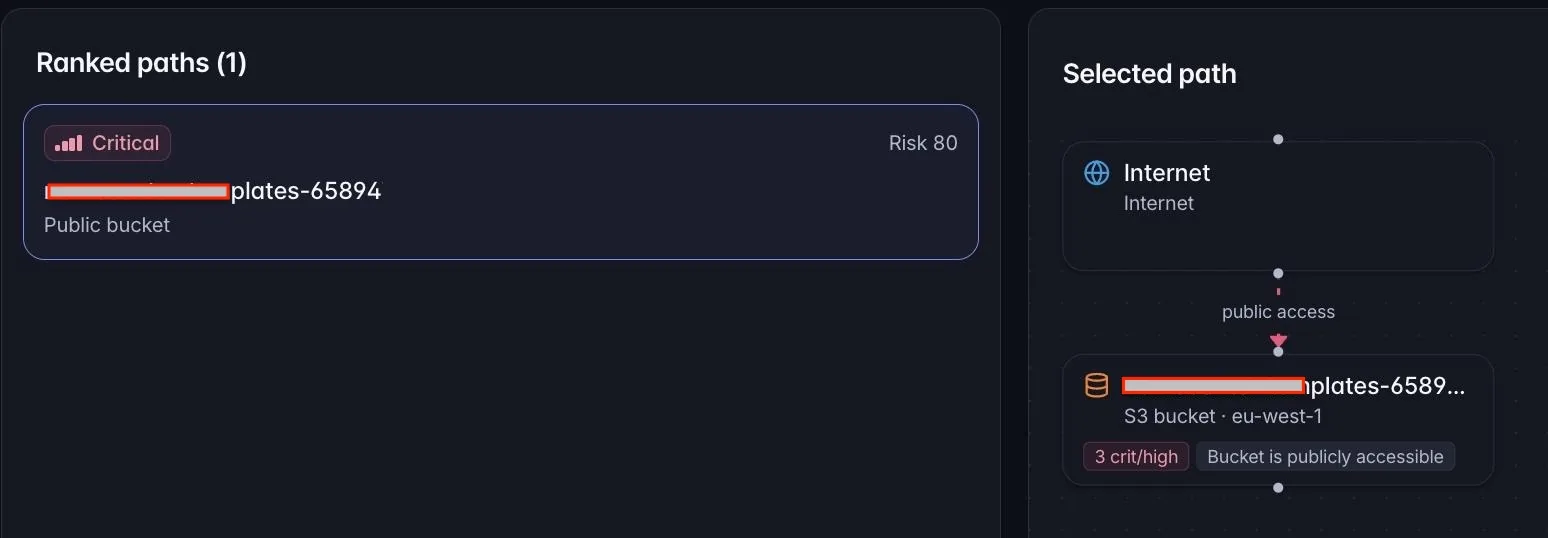
NerveCenter traces paths from the internet through an entry point and an IAM role to a data store, and flags direct exposures such as public buckets and databases. Each path gets a risk score, so you see the few chains that lead somewhere, not a thousand equal-looking findings.
- Ranked paths with a risk score
- Internet → entry point → IAM role → data store
- Each step links to the finding that opens it
FinOps
Cloud cost, explained, allocated and owned.
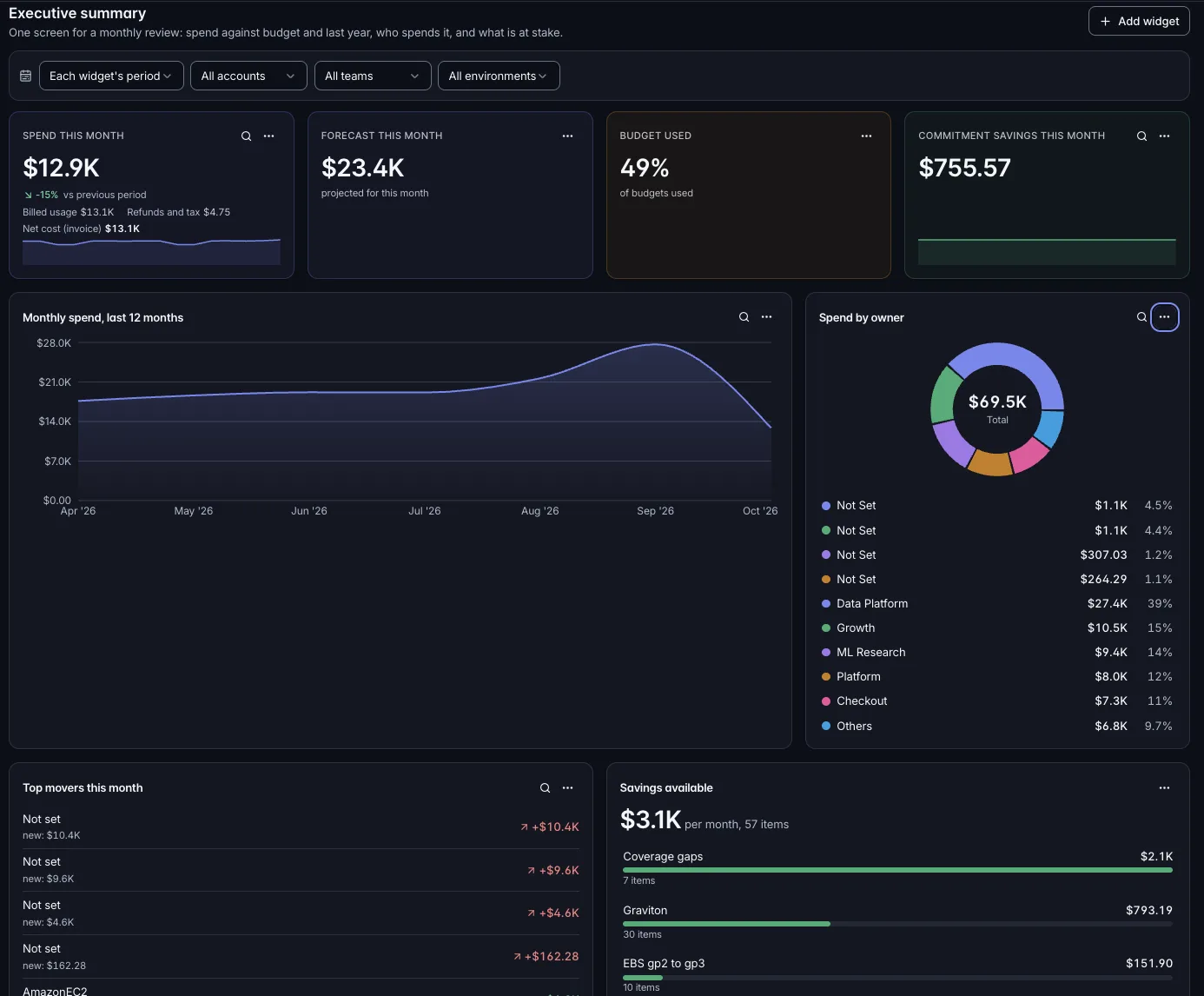
NerveCenter reads your AWS Cost and Usage Report (CUR 2.0) from your own bucket; raw billing files never leave it. Credits, discounts and refunds are shown apart from usage, so the numbers match your invoice. Executive dashboards answer the monthly review in one screen.
Explore
- Cost explorer by service, account and tag, with saved views
- Biggest changes versus the previous period
- Kubernetes (EKS) split cost
Report
- Executive dashboards built from widgets
- Spend, forecast, commitment savings, top movers and savings available
Allocate
- Showback by team, product or account
- Tag coverage and untagged spend
- Virtual tags with versioned rules; shared-cost pools; monthly statement e-mails
Control
- Budgets with forecasts and alerts
- Anomaly detection with an owner and a “what changed” view built from CloudTrail
Save
- Savings from idle and oversized resources, Graviton, gp2→gp3, Compute Optimizer and Cost Optimization Hub
- Savings Plans and Reserved Instance coverage
- Each saving verified against the bill
Cost Plan
Price a Terraform plan or CloudFormation template before you deploy.
FinOps for AI
Know what every model, token and GPU-hour costs.
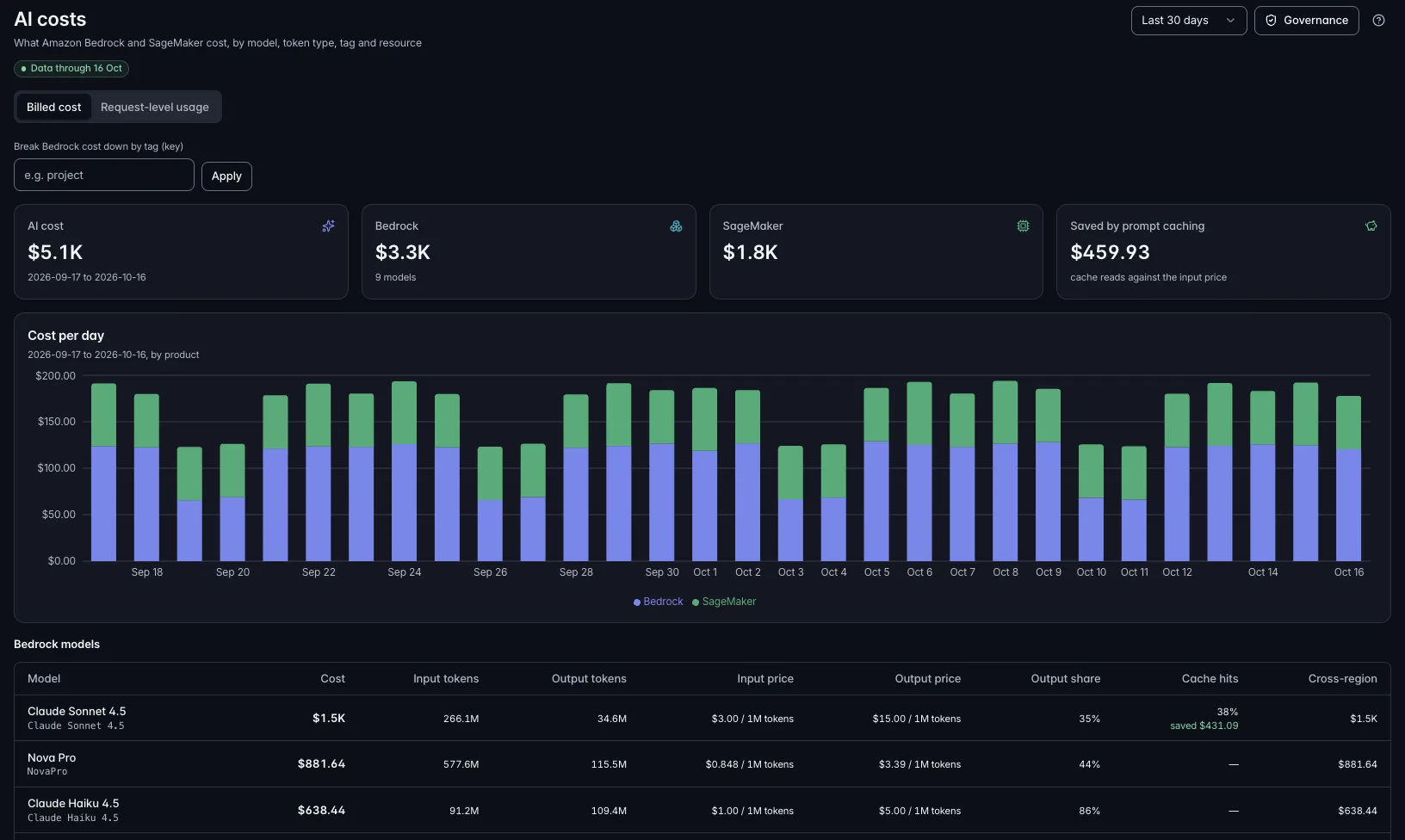
NerveCenter reads Amazon Bedrock and SageMaker cost straight from your bill, with no code changes. It breaks AI spend down by model, token type, tag and resource. Connect your Bedrock invocation logs to see cost per request, team and application. NerveCenter never collects prompts or responses.
- AI cost by model: input and output tokens, output share, cache hits, cross-region calls
- Savings from prompt caching, measured
- Recommendations: higher-priced cross-region calls, a pricier service tier, heavy input without caching, output-heavy workloads
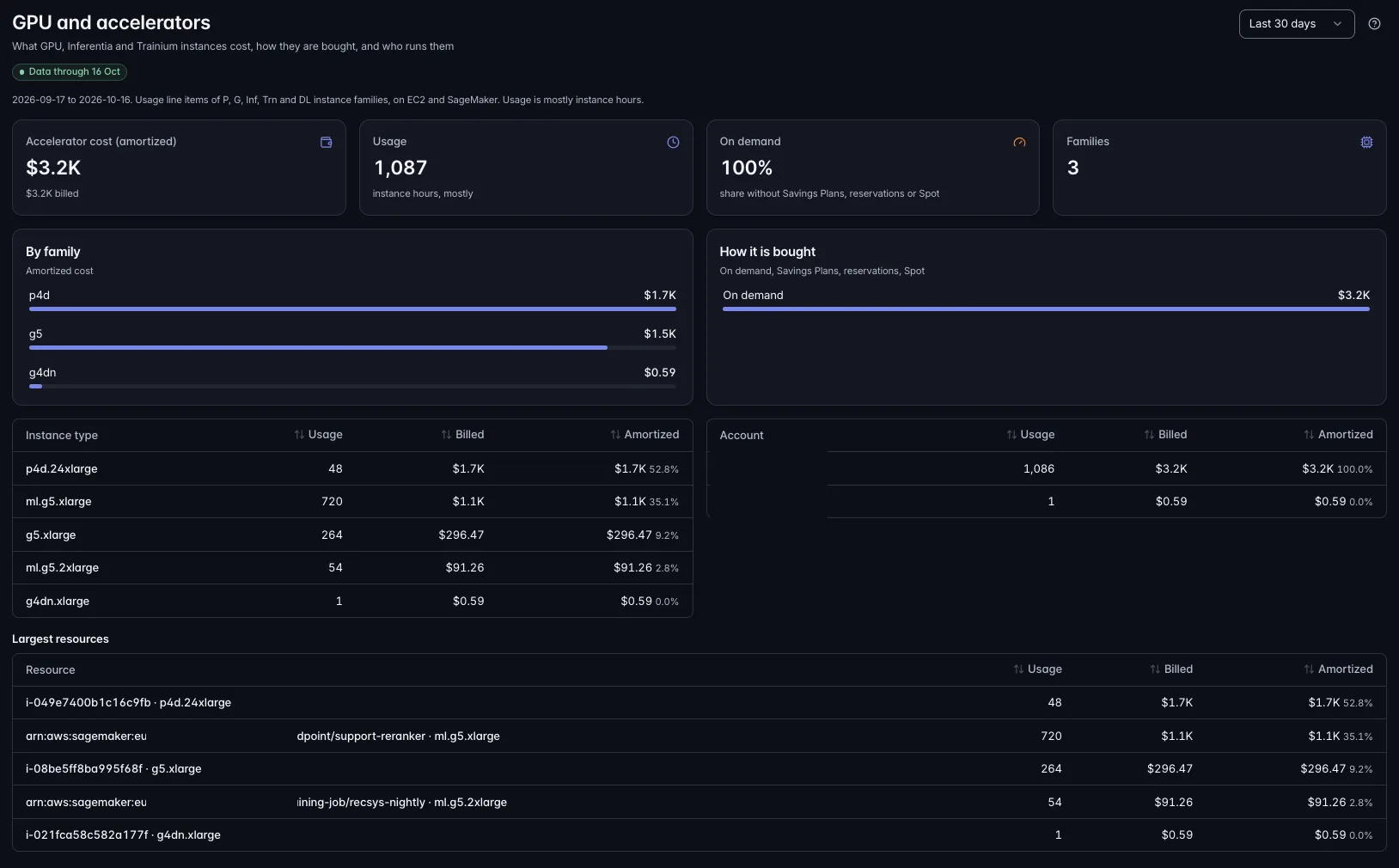
- GPU, Inferentia and Trainium cost by instance family, purchase type and resource
- Idle SageMaker endpoints
- Budgets and anomaly alerts for AI spend
AI governance
Run AI your customers and regulators can trust.
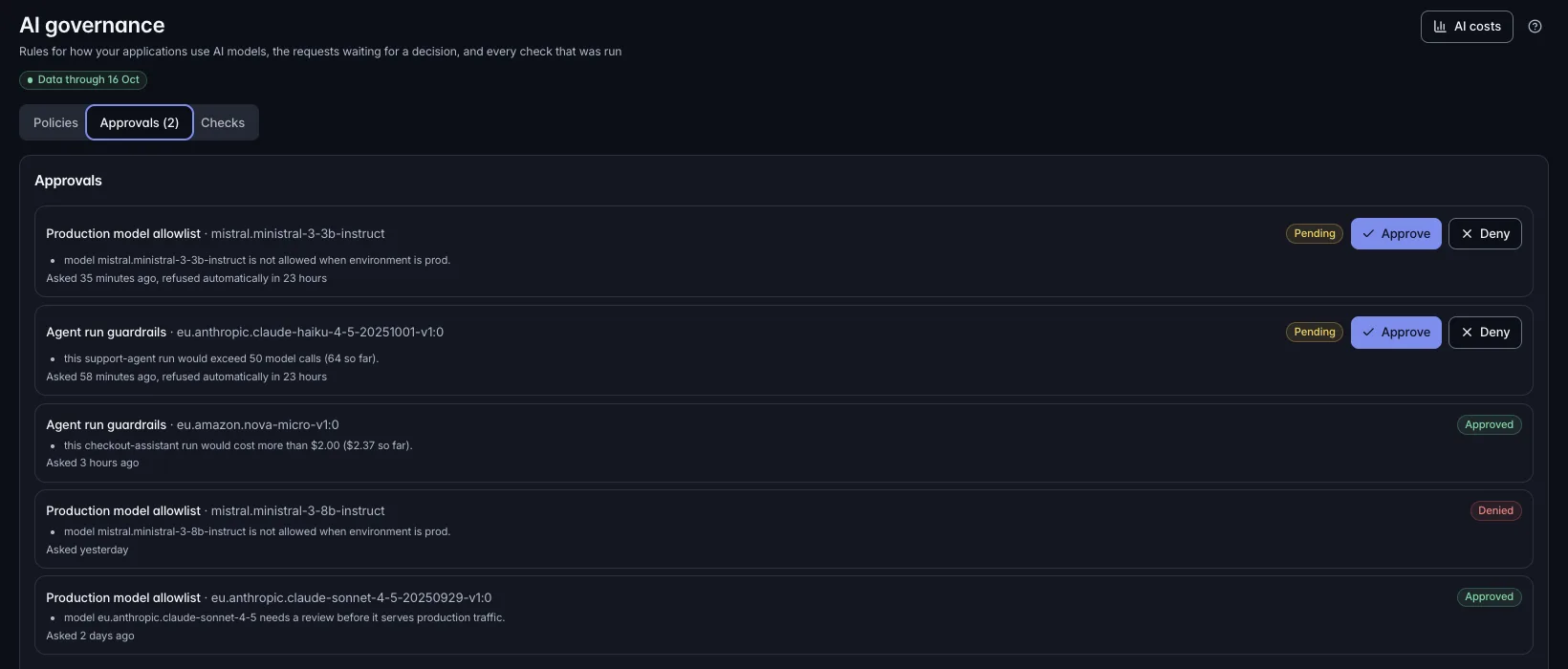
Set policies for how your applications use AI models: which models, in which environments, at what volume and spend. NerveCenter checks usage against them, and an application in approve mode can ask for a decision before it runs. Every approval and denial is recorded with who decided and when.
- AI policies in observe, warn or approve mode, with ready-made templates
- Approval requests with approve and deny, plus a full decision history
- Checks on Bedrock guardrails, logging and data flows
- EU AI Act readiness view and MITRE ATLAS lens
Assessed against:
- AWS AI Security Best Practices
- OWASP Top 10 for LLM Applications (2025)
- NIST AI RMF
- ISO/IEC 42001
EU AI Act support is a readiness assessment, not a statement of compliance.
AI built in, and open to your AI
Ask your cloud a question, from NerveCenter or from the AI tools you already use.
Built-in assistant
- Ask in plain language: “Which accounts have the most critical findings?” “Why did EC2 cost jump last week?”
- Answers only from your organization's data, and never changes anything in your AWS accounts
- Drafts the fix for a finding as CLI, Terraform or CloudFormation, for your engineers to review
- Runs on Claude on Amazon Bedrock, in the EU
API and MCP: bring your own AI tools
- A read-only MCP server connects Claude, ChatGPT, Cursor, VS Code and Claude Code to your live NerveCenter data
- Each person connects with their own sign-in and sees only what their role and account access allow
- A read-only REST API with scoped tokens for scripts, reports and internal tools
- Owners decide which AI tools may connect, and every call is logged
# ask NerveCenter
What did we spend on Bedrock last week, and which critical findings are open in production?
Integrations
Alerts and work where your team already is.
- Alerts to e-mail, Slack, Microsoft Teams and signed webhooks
- Jira Cloud issues from findings, anomalies and savings opportunities
- Weekly cost summary e-mail
- Tasks & approvals inbox for owners
- CSV exports of costs, compliance and showback
Trust
Agentless, read-only and secure by design.
Nothing to install. NerveCenter uses AWS APIs through an IAM role you deploy with our CloudFormation template or Terraform module. Connect one account or a whole AWS Organization.
Read-only by design. NerveCenter only reads. It never changes resources or buys commitments.
Confused-deputy protection. Every connection uses its own external ID, which you can rotate.
Your data stays separate. Every query is scoped to your organization and enforced by row-level security in the database.
Hosted in the EU. The platform and your data stay in the EU.
Secure sign-in. Authenticator-app MFA is required. Company single sign-on works with Microsoft Entra ID, Okta, Google Workspace or any SAML or OIDC provider, set up with our team.
Least privilege inside NerveCenter. Six roles, access limited to chosen AWS accounts, and an audit log of who did what.
No prompts collected. For AI workloads NerveCenter reads cost, usage and configuration, never prompts, responses or file contents.
Plans
Start with a free scan. Grow as you go.
Four plans, from a one-off Free Scan to Enterprise. We size each plan to your estate. Talk to us for a quote, or buy through AWS Marketplace once we're listed.
Free Scan
Starter
Growth
Enterprise
NerveCenter is one of seven CloudNerve products. See all products →
See NerveCenter on your own AWS data.
We connect NerveCenter read-only to one of your AWS accounts and walk you through security gaps, cost anomalies and AI spend, in 45 minutes.